Aaima Auto SKU Generator
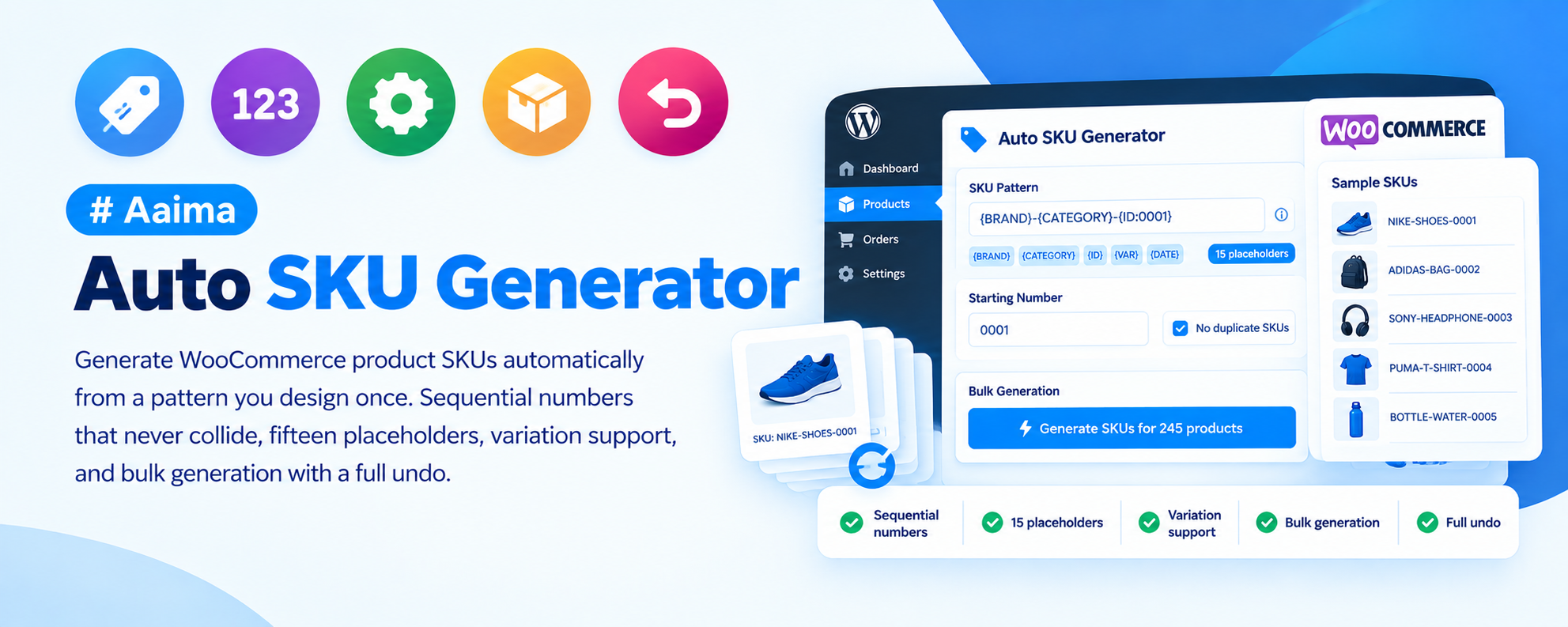
Generate WooCommerce product SKUs automatically from a pattern you design once. Sequential numbers that never collide, fifteen placeholders, variation support, and bulk generation with a full undo.
📑 Table of Contents
🚀 Getting Started
- • System Requirements
- • Installation
- • Designing a Pattern
- • Filling Existing Products
🏷️ Patterns
- • All 15 Placeholders
- • Common Formats
- • Sequential vs Random
- • Uniqueness Handling
👕 Variations
- • Variation Placeholders
- • Attribute-Based Codes
- • Readable Warehouse SKUs
📦 Bulk Generation
- • Two Modes
- • Category Filter
- • Undo
- • Batch Size
🔢 The Counter
- • Why It Is Atomic
- • Start, Padding, Increment
- • Resetting Safely
🔧 Support
- • Troubleshooting
- • FAQ
- • Changelog
System Requirements
What the plugin needs to run
WordPress
5.8+PHP
7.4+WooCommerce
6.0+Memory
128MB+No special requirements. On shared hosting, lower the bulk batch size if a large run stalls — 5 or 10 products per step is slower but far more reliable than 25.
Key Features
Never type a product code again
Pattern-Based SKUs
Mix plain text with placeholders in curly brackets. Everything outside the brackets is used exactly as you typed it.
Collision-Proof Counter
The sequential counter is incremented with a single atomic database statement, so two products saved in the same instant can never receive the same number.
Live Preview
The settings screen shows three real examples as you build the pattern. Nothing is saved until you press Save.
Variation Support
Variations get their own pattern built from the parent SKU, optionally using attribute values so staff can read colour and size off the label.
Bulk Generation
Fill in a whole catalogue in batches with a live log, filtered by category if you want different prefixes per range.
Full Undo
Every run records the previous SKU of every product it touches. One click puts them all back.
Guaranteed Unique
If a generated code is already taken, a number is appended until it is unique — so a duplicate SKU is impossible.
Works Everywhere
New products get a SKU whether they were added in the admin, imported from CSV, or created through the REST API.
Safe by Default
Existing SKUs are never overwritten unless you explicitly ask for it.
Installation Guide
Two ways to install
📦 Method 1: WordPress Admin
- 1
Go to Plugins → Add New
- 2
Click Upload Plugin
- 3
Choose aaima-auto-sku.zip
- 4
Click Install Now
- 5
Click Activate
📁 Method 2: FTP Upload
- 1
Extract aaima-auto-sku.zip
- 2
Connect to your server via FTP/SFTP
- 3
Navigate to /wp-content/plugins/
- 4
Upload the aaima-auto-sku folder
- 5
Activate in Plugins
After Activation: Go to Auto SKU in the admin menu, design your pattern with the live preview, then use Bulk Generate to fill in existing products.
Hard-refresh after uploading an update. Browsers cache plugin CSS and JavaScript. Press Ctrl+Shift+R (or Cmd+Shift+R) so you are not looking at the old version.
Setup in Three Steps
Then forget about it
1. Design a Pattern
Watch the live preview
2. Bulk Fill
Existing products
3. Forget It
New products are automatic
🏷️ Building a Pattern
Plain text mixed with placeholders in curly brackets
🔢 Sequence & Identity
- {number} — sequential, never repeats
- {random} — random characters
- {id} — the product ID
- {prefix} / {suffix} — your fixed text
📁 Product Data
- {category} — code from the first category
- {parent_cat} — top-level parent category
- {brand} — if a brand taxonomy exists
- {name} — initials from the product name
- {slug} — the product slug
- {price} — digits only
📅 Date
- {year} — four digits, e.g. 2026
- {year2} — two digits, e.g. 26
- {month} — 01 to 12
- {day} — 01 to 31
👕 Variations Only
- {parent} — the parent product SKU
- {sep} — your chosen separator
- {index} — 01, 02, 03 within the product
- {attributes} — a code like REDLRG
Use {number} in almost every case. It never repeats, reads in order and makes stocktaking easier. Reach for {random} only when a competitor being able to count your catalogue would actually matter.
Settings Reference
Patterns, counter and bulk options
⚙️ Behaviour
| Enable automatic SKU generation | The master switch. |
|---|---|
| Fill in the SKU when a product is saved | Applies to products saved with an empty SKU. |
| Overwrite SKUs that already have a value | Off by default. Leave it off unless you are deliberately recoding the shop. |
| Generate SKUs for variations too | Variations only receive a SKU once the parent has one. |
| Never create a duplicate SKU | Appends a number if a code is taken. Recommended. |
| Force uppercase | Applies to the whole generated SKU. |
🔢 The Sequential Counter
| Start at | The first number issued. Set 1000 if you would rather not advertise that a product is your first. |
|---|---|
| Zero padding | Total digits. 4 gives 0001 and keeps codes the same width until you pass 9999. |
| Increment by | Usually 1. Larger steps leave gaps you can fill manually later. |
| Reset counter to | Moves the counter. Raising it is safe; lowering it can produce numbers already used, though the uniqueness check still prevents a real duplicate. |
The counter is incremented with a single atomic SQL statement. This is the part most SKU plugins get wrong — reading a value and writing it back can hand the same number to two simultaneous saves.
📦 Bulk Generation
| Only products without a SKU | Completely safe. Anything already coded by hand is untouched. |
|---|---|
| All products | Replaces existing SKUs. Use when moving the whole shop to a new scheme. |
| Limit to category | Run one category at a time — the trick for giving each range its own prefix. |
| Batch size | Products processed per step. Lower it on slow hosting. |
| Undo last run | Restores every SKU the last run changed. Starting a new run replaces that history. |
Pattern Examples
Copy one of these as a starting point
🏷️ Product Patterns
| Pattern | Produces | Suits |
|---|---|---|
{prefix}{number} | AA-0001 | Most shops. Simple and always in order. |
{category}-{number} | CLO-0042 | Warehouses where the code should say what the product is. |
{category}-{year2}{month}-{number} | CLO-2608-0042 | Seasonal ranges, showing when a line was added. |
{brand}-{category}-{number} | NIKE-SHO-0007 | Resellers carrying many brands. |
{name}-{random} | CJP-7SZ4G2 | When codes should not reveal how many products you sell. |
👕 Variation Patterns
| Pattern | Produces | Notes |
|---|---|---|
{parent}{sep}{index} | AA-0001-01 | Simple and compact |
{parent}{sep}{attributes} | AA-0001-REDLRG | Staff read colour and size straight off the label |
{parent}{sep}{id} | AA-0001-1284 | Guaranteed unique, but not human-readable |
Troubleshooting Guide
Common issues and how to fix them
⚠️ New products are not getting a SKU
The field stays empty
❌ My existing SKUs were replaced
Hand-written codes are gone
ℹ️ Some SKUs end in -2 or -3
Unexpected suffixes
ℹ️ The category placeholder is empty
A gap in the code
ℹ️ The brand placeholder is empty
Nothing where the brand should be
⚠️ The bulk run stops partway
Progress bar freezes
ℹ️ "Save the product first"
The Generate button refuses
ℹ️ Variations did not get SKUs
Parent has one, variations do not
Frequently Asked Questions
Common questions answered
Q: Will it overwrite SKUs I typed myself?
No, not unless you ask it to. The default only fills empty SKU fields, and the bulk generator defaults to "only products without a SKU".
Q: Can different categories have different prefixes?
Yes. Use the category filter in the bulk generator: set the pattern to CLO-{number}, run it on Clothing, then change the pattern and run it on the next category.
Q: What happens if two products are saved at the same moment?
They receive different numbers. The counter uses a single atomic database statement rather than reading a value and writing it back, which is where most plugins produce duplicates.
Q: Can I undo a bulk run?
Yes. Every run records the previous SKU of every product it touched, and one click restores them. Starting a new run replaces that history, so check the result before running again.
Q: Does it work with CSV imports?
Yes. Products created by import, by the REST API, or in the admin all receive a SKU on save.
Q: Can I continue numbering from my old system?
Yes. Set "Start at" to one above your last existing number and match the prefix.
Q: Should I use sequential or random codes?
Sequential in almost every case — it never repeats, reads in order and makes stocktaking easier. Random only matters if you would rather competitors could not count your catalogue.
Q: Is it translated?
Yes, a complete French translation is included, using the standard WooCommerce term UGS.
Changelog
Version history
v1.0.0 — Initial Release
- Pattern-based SKU generation with 15 placeholders
- Atomic sequential counter that cannot produce duplicates
- Live preview showing three real examples as you type
- Variation patterns with {parent}, {sep}, {index} and {attributes}
- Bulk generation with category filter, live log and batch control
- Full undo restoring previous SKUs from a single run
- Uniqueness enforcement with automatic suffixing
- Generate SKU button on the product edit screen
- Complete French translation and built-in Help page
Support & Updates
We're here to help
6 Months Support
Via ThemeForest comments or support email. We reply within 24-48 hours on business days.
Free Lifetime Updates
All future updates are free, and included in the Aaima theme update package.
Built-in Help
Every screen of this plugin has a Help tab covering setup and troubleshooting, so the answer is always to hand.
Need Help?
Get support via ThemeForest comments or contact us directly
📧 Contact Support 📖 View Full DocsAaima Auto SKU Generator v1.0.0 | Part of the Aaima Theme package
WordPress 5.8+ | PHP 7.4+ | WooCommerce 6.0+ | HPOS Ready
© 2026 Nasir Mehmood — All Rights Reserved