Aaima Stock Order
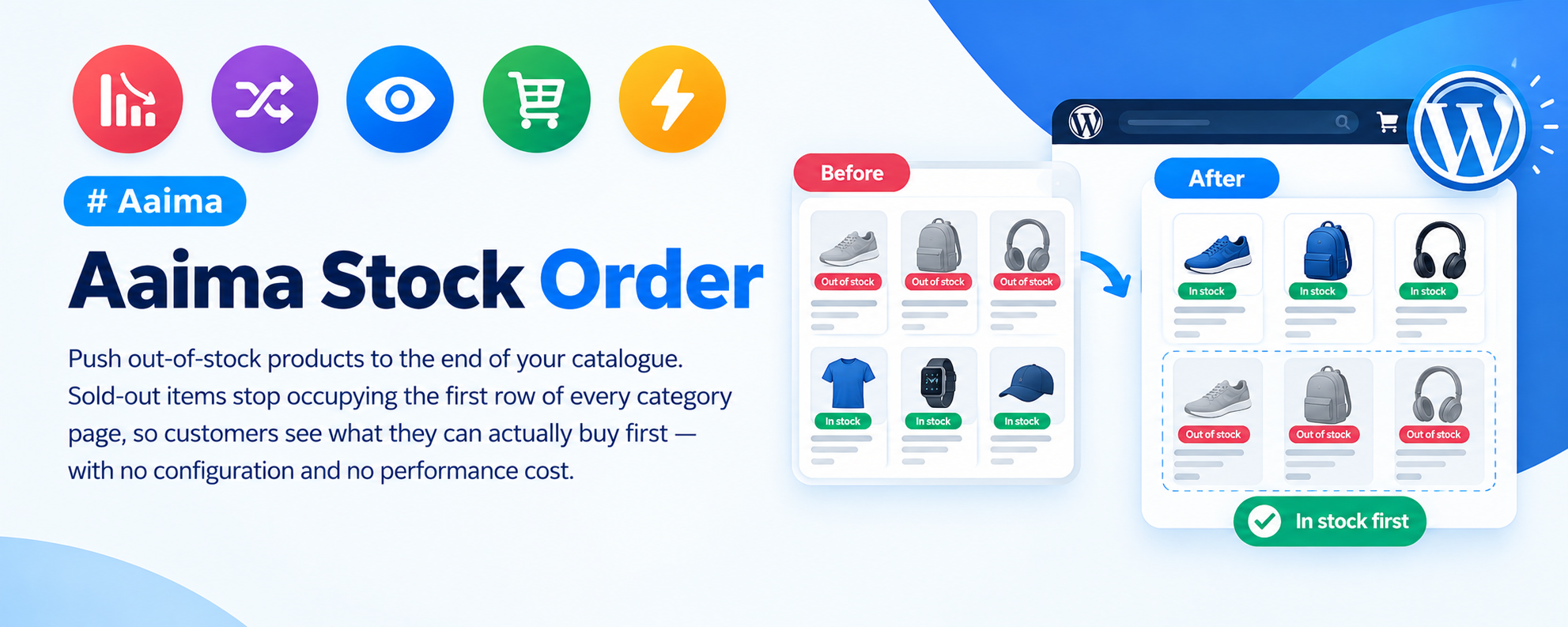
Push out-of-stock products to the end of your catalogue. Sold-out items stop occupying the first row of every category page, so customers see what they can actually buy first — with no configuration and no performance cost.
📑 Table of Contents
🚀 Getting Started
- • System Requirements
- • Installation
- • Nothing to Configure
📉 How It Works
- • The Problem It Solves
- • Where It Applies
- • Sorting Compatibility
🎯 Why It Matters
- • Conversion Impact
- • Customer Experience
- • Alternative Approaches
🔧 Support
- • Troubleshooting
- • FAQ
- • Changelog
System Requirements
What the plugin needs to run
WordPress
5.8+PHP
7.4+WooCommerce
6.0+Memory
128MB+The plugin adjusts the product query rather than filtering results in PHP, so there is no measurable performance cost even on a large catalogue.
Key Features
A small change with a real effect on sales
Out-of-Stock Last
Sold-out products are moved to the end of every listing, so the first thing a customer sees is something they can buy.
Works With Every Sort
Price low to high, popularity, newest, average rating — the chosen sort still applies, with stock status applied first.
Zero Configuration
Activate it and it works. There are no settings to get wrong.
Everywhere It Matters
Shop page, category archives, tag archives and search results.
No Performance Cost
Implemented as part of the product query rather than by filtering results afterwards.
Backorders Respected
Products available on backorder are treated as purchasable, not sold out.
Installation Guide
Two ways to install
📦 Method 1: WordPress Admin
- 1
Go to Plugins → Add New
- 2
Click Upload Plugin
- 3
Choose aaima-stock-order.zip
- 4
Click Install Now
- 5
Click Activate
📁 Method 2: FTP Upload
- 1
Extract aaima-stock-order.zip
- 2
Connect to your server via FTP/SFTP
- 3
Navigate to /wp-content/plugins/
- 4
Upload the aaima-stock-order folder
- 5
Activate in Plugins
After Activation: Nothing to configure. Visit a category page with some sold-out products and you will see them at the end.
Hard-refresh after uploading an update. Browsers cache plugin CSS and JavaScript. Press Ctrl+Shift+R (or Cmd+Shift+R) so you are not looking at the old version.
The Problem It Solves
Why sold-out products should not lead your catalogue
Before
Sold-out items first
Customer Sees
Things they cannot buy
After
Available items first
Result
More reachable products
📉 How It Works
One change to the product query
🎯 What It Does
- Adds stock status as the first sort key
- Your chosen sort becomes the second key
- In-stock and backorder products come first
- Out-of-stock products follow, still sorted correctly
📍 Where It Applies
- The main shop page
- Product category archives
- Product tag archives
- Search results
🔀 Sorting Compatibility
- Default sorting
- Popularity and average rating
- Latest products
- Price, low to high and high to low
🤔 Why Not Just Hide Them
- Hidden products lose their search rankings
- Customers cannot request a restock
- Reviews and links to the page are lost
- Sorting last keeps the page and the SEO value
WooCommerce can hide out-of-stock products entirely under Settings → Products → Inventory. That works, but it throws away the page, its search ranking and any inbound links. Sorting them last keeps all of that while still putting buyable products first.
Configuration
There is deliberately very little
⚙️ Settings
This plugin has no settings screen. It does one thing, and doing it needs no configuration.
- Activate the plugin — sorting changes immediately
- Deactivate it — WooCommerce returns to its normal order
- No database tables, no options, nothing left behind
If you need out-of-stock products hidden entirely rather than sorted last, use WooCommerce's own setting under WooCommerce → Settings → Products → Inventory → Out of stock visibility.
Troubleshooting Guide
Common issues and how to fix them
ℹ️ Sold-out products still appear first
No visible change
ℹ️ It does not work with my filter plugin
Order reverts when filtering
ℹ️ Backorder products are sorted last
Available items pushed down
ℹ️ Variable products behave oddly
Partially sold-out items
Frequently Asked Questions
Common questions answered
Q: Does it hide out-of-stock products?
No, it sorts them to the end. Hiding them entirely is a WooCommerce setting, but it costs you the page, its search ranking and any inbound links.
Q: Does it work with price sorting?
Yes. Stock status is applied first, then your chosen sort within each group — so sold-out products are still ordered by price among themselves.
Q: Will it slow down my shop?
No. It modifies the database query rather than filtering results in PHP, so the work is done by the database as part of the normal lookup.
Q: Are there any settings?
None, deliberately. The plugin does one thing and there is nothing to configure or get wrong.
Q: What about backordered products?
They count as purchasable and stay with the in-stock products, since the customer can still order them.
Q: What happens when I deactivate it?
WooCommerce returns to its normal ordering immediately. Nothing is left behind in the database.
Changelog
Version history
v1.0.0 — Initial Release
- Out-of-stock products sorted to the end of catalogue listings
- Applies to shop, category, tag archives and search results
- Compatible with every WooCommerce sorting option
- Query-level implementation with no performance cost
- Backorder products treated as purchasable
- No settings, no database tables, clean deactivation
Support & Updates
We're here to help
6 Months Support
Via ThemeForest comments or support email. We reply within 24-48 hours on business days.
Free Lifetime Updates
All future updates are free, and included in the Aaima theme update package.
Built-in Help
Every screen of this plugin has a Help tab covering setup and troubleshooting, so the answer is always to hand.
Need Help?
Get support via ThemeForest comments or contact us directly
📧 Contact Support 📖 View Full DocsAaima Stock Order v1.0.0 | Part of the Aaima Theme package
WordPress 5.8+ | PHP 7.4+ | WooCommerce 6.0+ | HPOS Ready
© 2026 Nasir Mehmood — All Rights Reserved