Aaima PDF Invoice
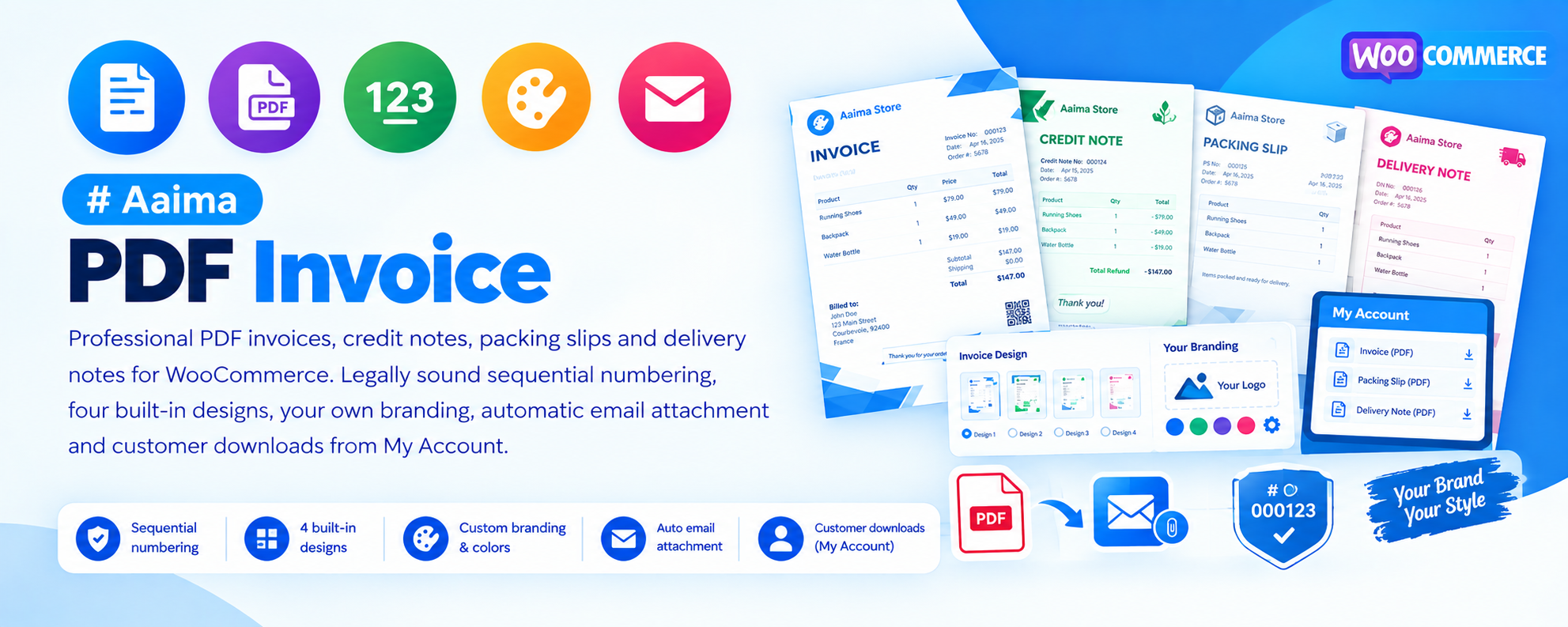
Professional PDF invoices, credit notes, packing slips and delivery notes for WooCommerce. Legally sound sequential numbering, four built-in designs, your own branding, automatic email attachment and customer downloads from My Account.
📑 Table of Contents
🚀 Getting Started
- • System Requirements
- • Installation
- • Company Details
- • Numbering Before Go-Live
🧾 Document Types
- • Invoice
- • Credit Note
- • Packing Slip
- • Delivery Note
🔢 Numbering
- • Why It Matters Legally
- • Prefixes & Placeholders
- • Yearly & Monthly Reset
- • Migrating From Another System
🎨 Design
- • Four Layouts
- • Accent Colour & Fonts
- • Tax Columns
- • Logo & Wording
📧 Delivery
- • Attach to Emails
- • Order Screen Buttons
- • Bulk Download
- • My Account Access
🔧 Support
- • Troubleshooting
- • FAQ
- • Developer Filters
- • Changelog
System Requirements
What the plugin needs to run
WordPress
5.8+PHP
7.4+WooCommerce
6.0+Memory
128MB+PDF generation is more demanding than a normal page load. 128 MB of PHP memory is recommended. If invoices fail on large orders, that is almost always the limit to raise first.
Key Features
Everything a shop needs to issue proper tax documents
Four Document Types
Invoice, credit note, packing slip and delivery note — each with its own numbering sequence, its own design behaviour and its own email rules.
Legally Sound Numbering
Numbers are claimed through a unique database index rather than a counter that is read then written back. Two orders completing in the same instant can never receive the same number.
Configurable Tax Columns
Show unit price and line total excluding tax, the tax amount, and the same figures including tax. Each column toggles independently, so B2B and B2C shops both get what they need.
Four Designs
Classic, Modern, Minimal and Compact, all driven by a single accent colour with softer background tints derived automatically.
Attach to Any Email
A simple grid maps each document type to each WooCommerce email. Most shops attach the invoice to the completed order email only.
Customer Downloads
Invoices appear as a download button in My Account. You choose which document types and which order statuses.
Bulk Download
Select orders in the list, choose a document type from bulk actions, and get one combined PDF ready for the printer.
Full Unicode
DejaVu Sans is bundled, so accented, Greek and Cyrillic characters render correctly rather than as empty boxes.
Private by Design
PDFs live in a protected folder and are streamed only after a permission check, because an invoice contains personal data.
Installation Guide
Two ways to install
📦 Method 1: WordPress Admin
- 1
Go to Plugins → Add New
- 2
Click Upload Plugin
- 3
Choose aaima-pdf-invoice.zip
- 4
Click Install Now
- 5
Click Activate
📁 Method 2: FTP Upload
- 1
Extract aaima-pdf-invoice.zip
- 2
Connect to your server via FTP/SFTP
- 3
Navigate to /wp-content/plugins/
- 4
Upload the aaima-pdf-invoice folder
- 5
Activate in Plugins
After Activation: Go to PDF Invoice in the admin menu, fill in your company details, then set your numbering before taking real orders.
Hard-refresh after uploading an update. Browsers cache plugin CSS and JavaScript. Press Ctrl+Shift+R (or Cmd+Shift+R) so you are not looking at the old version.
Setup in Four Steps
Get invoices out of the door
1. Company Details
Name, address, VAT
2. Pick a Design
Preview a real PDF
3. Set Numbering
Do this before go-live
4. Choose Emails
Which mail carries it
🧾 The Four Document Types
Each serves a different purpose and audience
🧾 Invoice
- The tax document your customer files
- Shows prices, itemised taxes, both addresses
- Issued when the order reaches a chosen status
- Number is permanent once issued
↩️ Credit Note
- Issued against a refund
- Describes what was actually given back
- References the original invoice number
- Required in most countries — you may not simply delete an invoice
📦 Packing Slip
- For whoever packs the box
- Deliberately shows no prices
- Safe to put inside a gift parcel
- Lists what to pick and how many
🚚 Delivery Note
- Travels with the parcel
- Leads with the delivery address
- Useful for couriers and the recipient
- Confirms contents on arrival
Set your numbering before going live. Issued numbers are permanent by design — in most countries you may not renumber an invoice you have already sent. If you are migrating, set "Start at" to one above your last existing number and match the prefix.
Settings Reference
Four tabs, every option explained
🏢 Company Tab
This becomes the "from" block at the top of every document. In most countries an invoice must carry your legal name, address and tax number.
| Company name | Your legal trading name as it should be printed. |
|---|---|
| Address | One line per line, exactly as printed. |
| VAT number | Required on invoices in the EU and many other territories. |
| Company registration | SIRET, Companies House number, and similar. |
| Logo | PNG or JPEG. SVG is not supported by the PDF engine. |
| Terms | Printed under the totals — payment terms, return policy. |
| Page footer | Repeated at the bottom of every page. |
| Payment terms | Days until due. Prints a due date. Set 0 for shops paid at checkout. |
🎨 Design Tab
| Layout | Classic (formal, B2B), Modern (coloured header band), Minimal (prints well in black and white), Compact (tighter rows for long orders). |
|---|---|
| Accent colour | Drives headings, the table header and the total. Background tints are derived from it automatically. |
| Paper size | A4, Letter or Legal. |
| Font | Keep DejaVu Sans if your shop uses accented or non-Latin characters. The others cannot render them. |
| Item table columns | Unit price excl. tax, line total excl. tax, tax, unit price incl. tax, line total incl. tax — each independent. |
| Include | SKU column, product thumbnails, payment method, shipping address, customer note. |
Thumbnails make each document noticeably slower to build. Leave them off unless you need them.
🔢 Numbering Tab
Each document type has its own independent sequence.
| Prefix / digits / suffix | Build the format. Digits pads with zeros — 5 gives 00001. |
|---|---|
| Placeholders | {Y} four-digit year, {y} two digits, {m} month, {d} day. |
| Start at | The first number issued. Use this when carrying on from another system. |
| Reset | Never, every year, or every month. If you reset, put {Y} in the prefix so numbers from different years stay distinct. |
| Use the order number | Mirror the WooCommerce order number instead of counting separately. Simpler to reconcile, but leaves gaps when an order is cancelled — which some tax authorities query. |
📧 Documents Tab
| Issue the invoice at | Which order statuses reserve a number. The first time an order reaches one of these, the invoice is numbered. |
|---|---|
| Credit notes | Create one automatically whenever a refund is recorded. |
| Rebuild PDFs | Off by default. An invoice records what was sold when it was issued, so it normally should not change afterwards. |
| Attach to emails | A grid mapping each document type to each WooCommerce email. |
| Available in My Account | Which types customers can download, and for which order statuses. |
Packing slips are internal documents — usually best left unticked for My Account.
Numbering Formats
Common setups you can copy
🔢 Prefix and Reset Combinations
| Prefix | Digits | Reset | Produces |
|---|---|---|---|
INV- | 5 | Never | INV-00001 → INV-00002 |
{Y}- | 5 | Every year | 2026-00001, restarting each January |
INV-{Y}{m}- | 3 | Every month | INV-202608-001 |
FA- | 4 | Never | FA-0001 — common French format |
💶 Column Setups by Shop Type
| Shop type | Columns to enable | Result |
|---|---|---|
| B2B / France | Unit ex., Total ex., Tax | Prix HT, Total HT, TVA |
| B2C simple | Unit inc., Total inc. | Tax-inclusive prices only, tax shown once at the bottom |
| Full breakdown | All five | Prix HT, Total HT, TVA, Prix TTC, Total TTC |
| Minimal | Total ex. only | A single price column |
Troubleshooting Guide
Common issues and how to fix them
❌ Accented characters show as boxes
é, ç or ü render wrong
❌ PDF generation fails or times out
Error or blank page
⚠️ The logo does not appear
Blank space where the logo should be
⚠️ Invoice not attached to emails
Customer receives no PDF
ℹ️ There is a gap in my invoice numbers
A number is missing from the sequence
ℹ️ Everything spills onto a second page
Page 1 is nearly empty
ℹ️ Customers cannot find their invoice
Nothing in My Account
ℹ️ Prices look wrong by about 20%
Totals do not match the order
Frequently Asked Questions
Common questions answered
Q: Can I change an invoice after sending it?
You can rebuild the PDF and the number stays the same. But if the amounts have changed, the correct approach almost everywhere is to issue a credit note and then a new invoice, rather than altering the original.
Q: Are the numbers really gap-free?
A number is claimed by inserting it into a database column that only permits unique values. If two orders complete simultaneously, one insert fails and that request takes the next number. Reading a counter and writing it back — the usual approach — can hand the same number to both.
Q: Where are the PDF files stored?
In a protected folder inside your uploads directory. They are never served directly — every download passes a permission check, because an invoice contains personal data.
Q: Can customers download their own invoices?
Yes, from My Account. You choose which document types and which order statuses are available.
Q: Does it work with HPOS?
Yes. The plugin declares compatibility with High-Performance Order Storage and the Cart/Checkout blocks.
Q: Can I print a batch for the warehouse?
Yes. Select the orders in the list, choose "Download packing slip PDFs" from bulk actions, and you get one combined PDF.
Q: Do I enter prices including or excluding tax?
Neither — the plugin reads them from the order. What you choose is which columns to display. Enable the tax columns that match how your shop sells.
Q: Is it translated?
Yes, a complete French translation is included, using proper HT / TTC terminology.
Changelog
Version history
v1.0.0 — Initial Release
- Four document types: invoice, credit note, packing slip, delivery note
- Gap-free sequential numbering via a unique database index
- Placeholders {Y} {y} {m} {d} with yearly and monthly reset
- Four designs driven by a single accent colour
- Five configurable tax columns (HT / TVA / TTC)
- Email attachment grid for every document type and WooCommerce email
- Order screen View / Download / Rebuild buttons and an orders list column
- Bulk download producing one combined PDF
- My Account downloads with per-status control
- Bundled DejaVu Sans for full Unicode support
- Protected storage with permission-checked streaming
- Complete French translation and built-in Help tab
Support & Updates
We're here to help
6 Months Support
Via ThemeForest comments or support email. We reply within 24-48 hours on business days.
Free Lifetime Updates
All future updates are free, and included in the Aaima theme update package.
Built-in Help
Every screen of this plugin has a Help tab covering setup and troubleshooting, so the answer is always to hand.
Need Help?
Get support via ThemeForest comments or contact us directly
📧 Contact Support 📖 View Full DocsAaima PDF Invoice v1.0.0 | Part of the Aaima Theme package
WordPress 5.8+ | PHP 7.4+ | WooCommerce 6.0+ | HPOS Ready
© 2026 Nasir Mehmood — All Rights Reserved