Aaima Table Rate Shipping
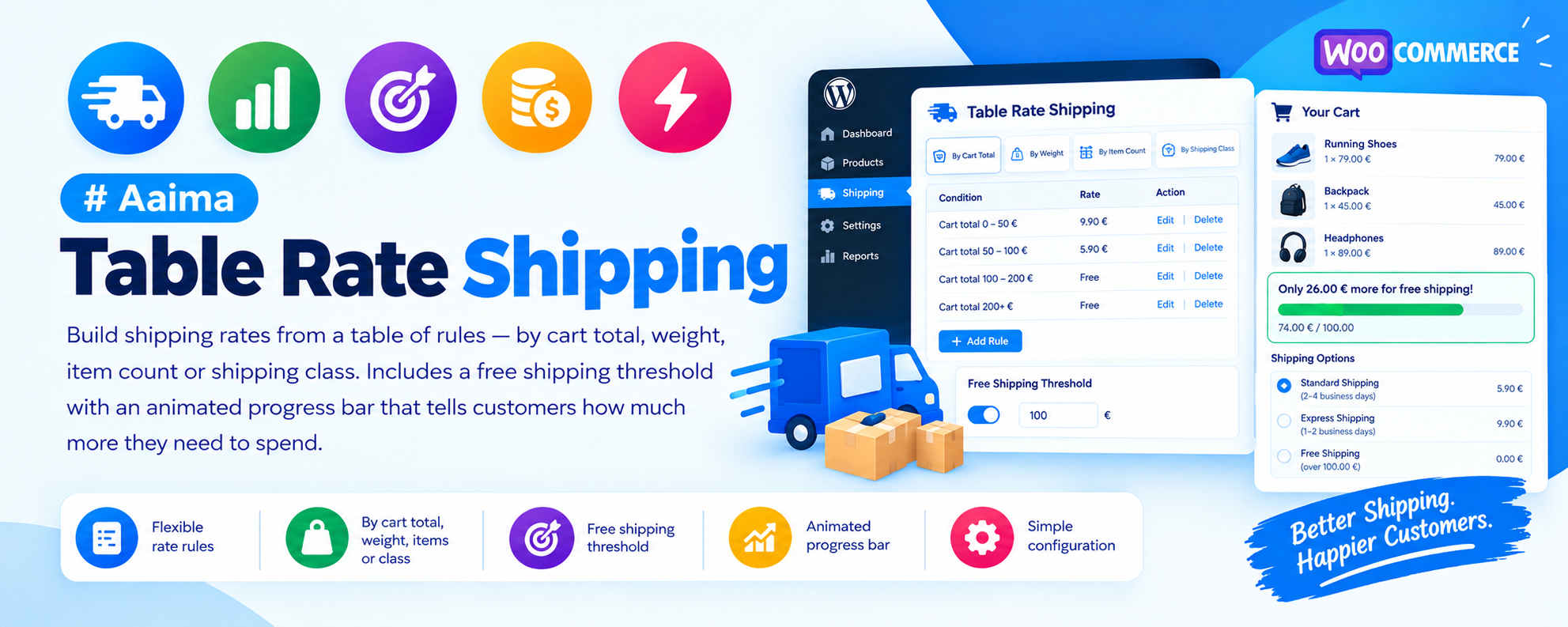
Build shipping rates from a table of rules — by cart total, weight, item count or shipping class. Includes a free shipping threshold with an animated progress bar that tells customers how much more they need to spend.
📑 Table of Contents
🚀 Getting Started
- • System Requirements
- • Installation
- • Adding to a Shipping Zone
- • Building Your First Table
📋 Rate Tables
- • Conditions Explained
- • Min & Max Bands
- • Cost Components
- • Shipping Class Rules
- • Starter Tables
🎁 Free Shipping
- • Setting the Threshold
- • What Counts Towards It
- • Excluded Shipping Classes
- • The Progress Bar
✨ The Notice
- • Where It Appears
- • Blinking Behaviour
- • Custom Wording
- • Colours & Shortcode
⚙️ Method Settings
- • Calculation Types
- • Handling Fee
- • Min & Max Cost
- • Tax Status
🔧 Support
- • Troubleshooting
- • FAQ
- • Developer Filters
- • Changelog
System Requirements
What the plugin needs to run
WordPress
5.8+PHP
7.4+WooCommerce
6.0+Memory
128MB+Products need a weight set on their Shipping tab for weight-based rules to work. Without one, WooCommerce treats a product as weightless and every cart falls into your lightest band.
Key Features
Everything WooCommerce shipping should have done out of the box
Rate Tables
Write a table of rules instead of a single flat rate. Each row is one band — 0-2 kg costs €4.90, 2-10 kg costs €8.90 — and WooCommerce charges whichever row the cart falls into.
Four Conditions
Measure by order total, total weight, number of items, or use an "always apply" row for a flat rate. Each row can measure something different.
Composite Costs
A base cost plus optional per-item, per-unit-of-weight and percentage components. Combine them freely — €3 base plus €0.50 per item on four items comes to €5.
Free Shipping Threshold
One amount applied across every zone and every rate. Reaching it zeroes the shipping cost while the customer keeps their choice of carrier.
Progress Bar
Shows how close the customer is, fills as they shop, and celebrates when they cross the line. Available on cart, checkout, mini cart and via shortcode.
Shipping Class Rules
Restrict a row to carts containing a product in a given class — the usual way to price fragile or oversized goods differently.
Three Calculation Modes
Offer every matching row as a customer choice, add them into one price, or quietly pick the cheapest.
Starter Tables
One click fills the grid with a working example by weight, order total or item count. Adjust rather than starting from an empty screen.
Considerate by Default
The bar pulses gently a few times rather than flashing forever, and respects the reduced-motion setting on the customer's device.
Installation Guide
Two ways to install
📦 Method 1: WordPress Admin
- 1
Go to Plugins → Add New
- 2
Click Upload Plugin
- 3
Choose aaima-table-rate-shipping.zip
- 4
Click Install Now
- 5
Click Activate
📁 Method 2: FTP Upload
- 1
Extract aaima-table-rate-shipping.zip
- 2
Connect to your server via FTP/SFTP
- 3
Navigate to /wp-content/plugins/
- 4
Upload the aaima-table-rate-shipping folder
- 5
Activate in Plugins
After Activation: Go to WooCommerce → Settings → Shipping, open a zone, and add the Aaima Table Rate method. Then set your free shipping amount under Table Rates → Free shipping bar.
Hard-refresh after uploading an update. Browsers cache plugin CSS and JavaScript. Press Ctrl+Shift+R (or Cmd+Shift+R) so you are not looking at the old version.
Setup in Four Steps
From install to live rates
1. Install
Upload & activate
2. Add to a Zone
This step is essential
3. Build the Table
Use a starter table
4. Set Free Shipping
One amount, all zones
📋 How a Rate Table Works
Each row is a rule; WooCommerce reads them top to bottom
🎯 Condition
- Order total — the cart value
- Total weight — sum of product weights
- Number of items — total quantity
- Always apply — a flat row with no condition
📏 Min and Max
- The band the cart must fall into
- Both ends are inclusive
- Leave Max blank for "and above"
- Bands must not overlap, or two prices show
💰 Cost Components
- Cost — the base price for the row
- Per item — multiplied by quantity
- Per weight — multiplied by total weight
- Percent — of the order total
- Leave a box blank to ignore it
🏷️ Restrictions
- Shipping class limits a row to certain goods
- Label overrides the method title
- Drag rows by the handle to reorder
A common mistake: writing bands as 0–2 and 2–10. Because both ends are inclusive, a cart weighing exactly 2 kg matches both rows and the customer sees two prices. Start the next band just above the previous maximum — 0–2, then 2.01–10.
Settings Reference
Every option explained
⚙️ Shipping Method Settings
Set per instance, inside the shipping zone. Click the method name to edit it.
| Title | What customers see at checkout when a rate does not set its own label. |
|---|---|
| Tax status | Taxable or None. If Taxable, enter costs excluding tax and WooCommerce adds it. |
| When several rows match | Offer each as a choice (friendliest), add them into one price, or take the cheapest. |
| Handling fee | Added to every rate. A flat number, or a percentage such as 5%. |
| Minimum cost | A rate is never cheaper than this. |
| Maximum cost | A rate is never more expensive than this — useful as a safety cap on percentage rules. |
🎁 Free Shipping Threshold
Set once under Table Rates → Free shipping bar. Applies to every zone.
| Order over | The amount that unlocks free delivery. Reaching it zeroes the shipping cost. |
|---|---|
| Measured on | Subtotal after discounts (default, stricter) or before discounts (more generous — a coupon cannot push the customer back below the line). |
| Count tax | Whether tax counts towards the threshold. Off by default. |
| Never counts | Shipping classes excluded from the threshold, so a bulky item never earns free delivery. |
Local pickup is never zeroed by this — only delivery methods are.
📊 The Progress Bar
| Show the bar | Enable it, and choose cart, checkout and mini cart independently. |
|---|---|
| Style | Message with a progress bar, or message only. |
| Show when empty | Also advertise the threshold to visitors with an empty cart. |
| Wording | Three messages — still to go, unlocked, and empty cart. |
| Placeholders | {remaining}, {threshold}, {total}, {percent} |
| Colours | Progress bar, unlocked state, text and background. |
| Shortcode | [aaima_free_shipping_bar] for anywhere else on the site. |
✨ Blinking
The bar pulses to draw attention at the right moment. These controls keep it useful rather than irritating.
| When to blink | When free shipping is unlocked (recommended), also when the customer is close, or never. |
|---|---|
| "Close" means | The percentage of the way to the threshold that counts as close. 80% by default. |
| Pulse speed | Milliseconds per pulse. 900 ms is calm; below 400 ms starts to feel frantic. |
| Number of pulses | How many times it pulses before stopping. 0 blinks forever. |
A few pulses catch the eye and then stop, which is far easier to shop next to than a banner that flashes forever. Customers whose device asks for reduced motion always see a still bar.
Example Rate Tables
Copy these as a starting point
⚖️ By Weight — the most common setup
Weights in kg. Note how each band starts just above the previous maximum.
| Condition | Min | Max | Cost | Meaning |
|---|---|---|---|---|
| Total weight | 0 | 2 | 4.90 | Up to 2 kg |
| Total weight | 2.01 | 10 | 8.90 | 2 kg to 10 kg |
| Total weight | 10.01 | blank | 14.90 | Anything heavier |
💰 By Order Total — reward bigger baskets
| Condition | Min | Max | Cost | Meaning |
|---|---|---|---|---|
| Order total | 0 | 50 | 5.90 | Small orders pay full price |
| Order total | 50.01 | blank | 3.90 | Larger orders pay less |
📦 By Item Count — with a per-item component
| Condition | Min | Max | Cost | Per item | Result for 6 items |
|---|---|---|---|---|---|
| Number of items | 1 | 3 | 4.90 | — | 4.90 |
| Number of items | 4 | blank | 2.90 | 0.50 | 5.90 |
🇫🇷 Colissimo Domicile — France (2026 public rates)
Enter the HT column if the method Tax status is Taxable; enter TTC if it is None.
| Min (kg) | Max (kg) | Cost TTC | Cost HT |
|---|---|---|---|
| 0 | 0.25 | 5.49 | 4.58 |
| 0.251 | 0.5 | 7.59 | 6.33 |
| 0.501 | 0.75 | 9.29 | 7.74 |
| 0.751 | 1 | 9.59 | 7.99 |
| 1.001 | 2 | 11.19 | 9.33 |
| 2.001 | 5 | 17.39 | 14.49 |
| 5.001 | 10 | 25.29 | 21.08 |
| 10.001 | 15 | 31.99 | 26.66 |
| 15.001 | 30 | 39.59 | 32.99 |
Troubleshooting Guide
Common issues and how to fix them
❌ No shipping options at checkout
The customer cannot proceed
⚠️ Weight rows never match
Every cart uses the lightest band
⚠️ Two prices shown for one delivery
Duplicate options at checkout
⚠️ Free shipping is not applied
Customer passed the amount but still pays
ℹ️ The bar does not update on quantity change
Message stays the same
ℹ️ Two free shipping messages appear
The bar shows twice
ℹ️ Local pickup became free too
Pickup shows €0
ℹ️ Percentage rule produces huge costs
Shipping is more than the goods
Frequently Asked Questions
Common questions answered
Q: Can I offer several delivery speeds?
Yes. Add rows with different labels and set "When several rows match" to offer each as a choice. The customer picks at checkout.
Q: Can I keep charging for express delivery when free shipping applies?
Yes. The aaima_table_rate_make_rate_free filter receives each rate and can return false to leave it chargeable.
Q: Does it work with several shipping zones?
Yes. Each zone gets its own rate table, so you can price domestic and international separately. The free shipping threshold is global and applies to all of them.
Q: Can I use it alongside carrier plugins like Colissimo or Mondial Relay?
Yes. Those register their own shipping methods and appear next to yours. The free shipping threshold zeroes them too, unless you filter them out.
Q: What counts towards the free shipping threshold?
By default the subtotal after discounts, excluding tax. You can switch to before discounts, include tax, and exclude whole shipping classes.
Q: Is the blinking accessible?
Yes. It is a soft pulse rather than a flash, it stops after a set number of beats, and it is disabled entirely for anyone whose device requests reduced motion.
Q: Can I put the progress bar on a product page?
Yes, with the [aaima_free_shipping_bar] shortcode. It updates as the cart changes just like the cart page copy.
Q: Is it translated?
Yes, a complete French translation is included. All strings are internationalised for other languages.
Changelog
Version history
v1.0.0 — Initial Release
- Rate tables with four conditions: order total, weight, item count, always apply
- Composite costs: base + per item + per weight + percentage
- Shipping class restrictions per row
- Three calculation modes: choice, sum, cheapest
- Handling fee (flat or percentage), minimum and maximum cost
- Free shipping threshold applied across all zones
- Animated progress bar for cart, checkout, mini cart and shortcode
- Configurable blink mode, speed and pulse count, with reduced-motion support
- Starter rate tables and drag-to-reorder rows
- Complete French translation and built-in Help tab
- HPOS and Cart/Checkout block compatibility
Support & Updates
We're here to help
6 Months Support
Via ThemeForest comments or support email. We reply within 24-48 hours on business days.
Free Lifetime Updates
All future updates are free, and included in the Aaima theme update package.
Built-in Help
Every screen of this plugin has a Help tab covering setup and troubleshooting, so the answer is always to hand.
Need Help?
Get support via ThemeForest comments or contact us directly
📧 Contact Support 📖 View Full DocsAaima Table Rate Shipping v1.0.0 | Part of the Aaima Theme package
WordPress 5.8+ | PHP 7.4+ | WooCommerce 6.0+ | HPOS Ready
© 2026 Nasir Mehmood — All Rights Reserved